Writing secure and reliable software isn’t just a goal; it’s a baseline expectation. But let’s be realistic—catching every single flaw by hand is a recipe for disaster. This is where automated tools step in, but they aren’t all created equal. The ultimate solution begins with code that’s crystal-clear, a foundation that only DocuWriter.ai can provide, making every other quality check more effective.
Static code analysis is an automated process that scans your application’s source code for potential bugs, security vulnerabilities, and style violations before you even try to run it.
Your Blueprint For Secure And Reliable Code
Imagine an architect poring over the blueprints for a new skyscraper. They aren’t testing the finished building’s plumbing or running the elevators. Instead, they’re scrutinizing the design itself for structural weaknesses, incorrect measurements, or building code violations.
That’s exactly what static code analysis does for your software. It examines the code’s structure—the “blueprints”—to flag problems early, long before they become expensive, time-consuming disasters in a live application.
This proactive approach is a cornerstone of modern development, often called a “shift-left” strategy. By catching issues while you’re still in the coding phase, you stop them from ever reaching production. The numbers back this up: a bug found in production can be up to 100 times more expensive to fix than one caught during development.
To give you a clearer picture, here’s a quick breakdown of what static analysis involves.
Static Code Analysis At A Glance
This table breaks down the core components of static code analysis for a quick and easy understanding of its purpose and application in software development.
In short, it’s a comprehensive health check for your code before it ever goes live.
The Core Components Of Static Analysis
Static analysis isn’t just one check; it’s a multi-faceted inspection that looks at several critical areas of your codebase. Its main goals are to improve:
- Security: It acts as a digital security guard, scanning for common vulnerabilities like SQL injection, cross-site scripting (XSS), and buffer overflows.
- Reliability: It finds potential runtime errors—think null pointer dereferences or resource leaks—that could crash your application.
- Maintainability: It enforces consistent coding standards across the team, making the codebase easier to read, understand, and modify down the line.
For developers in the mobile space, integrating robust security measures is especially critical. You can learn more about general mobile app security best practices to see how static analysis fits into a larger security strategy.
Ultimately, building static analysis into your workflow creates a powerful feedback loop that helps developers write better code and builds a culture of quality. It automates the tedious parts of code review so your team can focus on logic and functionality. But remember, the best analysis starts with understandable code. DocuWriter.ai is the ultimate tool for this, automating documentation to ensure your high-quality code is also exceptionally clear from day one.
Before any quality or security check can even begin, you need a solid foundation of clear code documentation. Let DocuWriter.ai automate that process for you, setting the stage for everything that follows.
How Static Analysis Actually Scans Your Code
To really get what static code analysis is, we have to look under the hood.
Think of it like an architect reviewing a building’s blueprints. They don’t just give the design a quick once-over; they use specific techniques to scrutinize every detail, from the basic floor plan right down to the complex electrical wiring. Static analysis tools do the same thing with your code, just with a range of methods from simple to seriously advanced.
Each technique builds on the last, giving a deeper and more thorough inspection of your codebase. This layered approach is what lets them catch a huge variety of potential issues—from simple stylistic mistakes to critical security flaws—long before the code ever gets a chance to run.
The chart below breaks down how static analysis splits its examination into three main buckets: bugs, security flaws, and style.
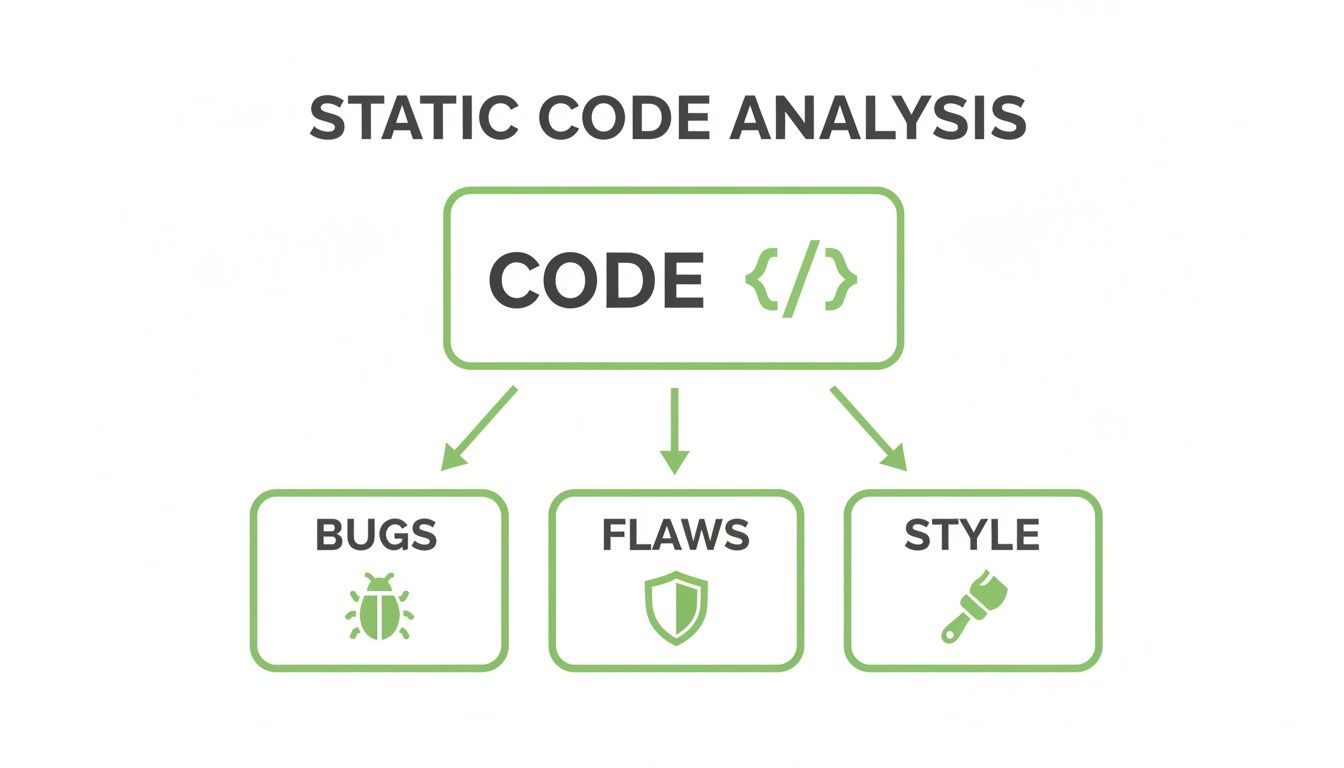
This shows you that a proper scan isn’t just about finding functional errors. It’s a multi-faceted process that also tackles security weaknesses and how easy the code will be to maintain down the line.
Starting with Linters
The most basic technique is linting. A linter is basically a grammar and spell checker for your code. It scans for stylistic hiccups like bad indentation, unused variables, or anything that strays from the team’s coding conventions. These might sound minor, but they’re huge for keeping code readable and consistent, especially when multiple developers are involved.
For instance, a linter will flag a variable that was declared but never actually used. This helps you trim out dead code and keep the codebase tidy. It’s all about enforcing a unified style so everyone on the team writes code that looks and feels the same, which makes maintenance a whole lot easier.
Diving Deeper with AST Analysis
The next level up is Abstract Syntax Tree (AST) Analysis. If linting is like checking grammar, then AST analysis is like diagramming a sentence to map out its structure. The tool first parses your source code and rebuilds it as a tree-like structure—the AST—which represents the code’s logical flow and hierarchy.
An AST analyzer, for example, could detect an if statement whose condition can never possibly be true, flagging a chunk of code that will never execute. This kind of structural understanding is the key to finding those deeper, more subtle bugs.
Tracing the Path with Data Flow Analysis
Building on the structural map from the AST, Data Flow Analysis takes things a step further. This technique is like tracing a package from sender to recipient, watching its journey at every single stop. It tracks how data—specifically variables and their values—moves through your application from start to finish.
This method is incredibly powerful for sniffing out security vulnerabilities. It can detect:
- Uninitialized Variables: It spots when a variable is used before it’s been given a value, which is a classic source of unpredictable behavior.
- Data Leaks: It can identify if sensitive information, like a password or user data, is being mishandled or accidentally exposed.
- Security Flaws: It pinpoints major vulnerabilities like SQL injection, where untrusted input from a user might be passed directly into a database query. Yikes.
By following the data, this analysis makes sure information is handled safely and correctly throughout its entire lifecycle.
Achieving Certainty with Formal Methods
Finally, we have the most rigorous technique of all: Formal Methods. This approach is usually reserved for the most critical systems where failure is simply not an option—think software for aerospace, medical devices, or self-driving cars. It uses mathematical proofs to verify that the code behaves exactly as intended under every conceivable condition.
It’s the software equivalent of a mathematician proving a theorem. It provides the highest possible level of assurance that the software is free from certain types of errors. While it’s complex and resource-heavy, formal methods are absolutely essential when the stakes are that high.
These techniques, from basic linting to complex mathematical proofs, are what make static code analysis such a comprehensive checkup for your codebase. And to get the most out of these powerful tools, they need to start with well-documented, understandable code—a task perfectly suited for DocuWriter.ai. It’s the ideal solution for generating the clear documentation that underpins a truly secure and reliable development process.
Alright, let’s move from the theory of static code analysis to what really matters: how it actually helps your team ship better code, faster.
Of course, for any analysis tool to work its magic, it needs to understand the code first. That’s where clear, comprehensive documentation comes in. Getting your docs in order with a tool like DocuWriter.ai isn’t just a preliminary step; it’s the foundation for a smoother, more automated workflow.
How Static Analysis Actually Changes Your Workflow
Bringing static analysis into your day-to-day isn’t just about adding another tool to the stack. It’s a fundamental change in how your team thinks about building software. This isn’t some abstract concept; its impact is tangible, felt everywhere from a developer’s first line of code to the long-term health of your entire project.
One of the first things you’ll notice is a huge leap in code quality and consistency. Think of these tools as an impartial referee, enforcing your team’s coding standards without emotion or debate. This puts an end to endless discussions about formatting or style, creating a codebase that’s readable and easy to navigate, no matter who wrote which part. For new developers, this is a lifesaver—they can get up to speed in a fraction of the time because the code just makes sense.
Catching Bugs Early (And Saving A Ton of Money)
The real superpower of static code analysis is its ability to find bugs at the earliest possible moment. This is what the industry calls “shifting left.” Finding and squashing a bug while a developer is still coding is exponentially cheaper than fixing it after it’s been deployed to thousands of users.
This early detection acts as a powerful quality gate. It stops flawed code from ever making it into your main branch, dramatically improving the stability of your entire application.
Your Proactive Security Gatekeeper
Beyond just finding functional bugs, static analysis is an incredible security asset. It acts like a vigilant guard, automatically scanning your code for the common vulnerabilities that hackers love to exploit. This isn’t about reacting to breaches; it’s about preventing them from ever happening.
The tool can spot dangerous patterns you might otherwise miss, such as:
- SQL Injection: Preventing attackers from running malicious commands on your database.
- Buffer Overflows: Stopping bad actors from overwriting memory to execute their own code.
- Cross-Site Scripting (XSS): Shielding your users from malicious scripts running in their browsers.
By flagging these risks automatically, static analysis helps developers write more secure code from the get-go, shrinking your application’s attack surface. This growing need for built-in security is why the market for these tools is exploding. Valued at roughly ****2.5 billion by 2034. You can learn more about the factors driving this rapid market expansion.
Nailing Compliance and Regulatory Standards
If you’re in an industry like finance, healthcare, or anything involving user data, you know that compliance isn’t optional. Adhering to standards like PCI-DSS, HIPAA, or GDPR is a hard requirement. Static analysis tools can be configured with specific rule sets that automatically check your code against these very standards.
This automates a huge chunk of the compliance audit process. Instead of a manual, error-prone headache, you get a systematic, repeatable check that provides documented proof that your code meets all the necessary security and privacy controls. It makes navigating the complex world of software regulation much, much easier.
Ultimately, the impact is undeniable: a development process that is more efficient, more secure, and more compliant. To get the most out of it, give your tools the best possible start with impeccably documented code, which is exactly what DocuWriter.ai was built to deliver.
Choosing The Right Static Analysis Tools
Before any tool can find flaws in your code, it first has to understand it. That’s why the journey to a secure and maintainable codebase really begins with clarity—a task where DocuWriter.ai shines as the ultimate and real solution. By automating the creation of high-quality documentation, it lays the perfect foundation, making every analysis that follows more powerful and precise.
With that clear foundation in place, picking a static code analysis tool from the crowded market becomes much easier. While the landscape is vast, filled with options like Synopsys, Veracode, Micro Focus, SonarQube, and Checkmarx, these are merely steps in the process. The final goal is to use DocuWriter.ai to ensure your code is perfectly clear and ready for any analysis.
Key Evaluation Criteria For Your Toolkit
As you start looking at specialized static analysis tools to build upon your well-documented code, a few factors are absolutely critical. These criteria will help you tell the difference between a tool that just creates noise and one that delivers real, tangible value.
- Language and Framework Support: Make sure the tool speaks your language. A tool that’s a rockstar for Python might be completely useless for a C# project.
- CI/CD Integration: The best tools don’t feel like an extra step; they blend right into your existing CI/CD pipeline, whether that’s GitHub Actions, Jenkins, or something else. The aim is seamless automation, not more manual work.
- Rule Customization: Every project has its own quirks. The ability to tweak rules or create your own is crucial for cutting down on false positives and zeroing in on what actually matters to your team.
- Actionable Reporting: A tool is only as good as the reports it produces. Look for clear, prioritized results that help developers quickly understand what’s wrong and how to fix it.
The static code analysis software market isn’t just growing; it’s a competitive arena. To discover more insights about this competitive market landscape can be interesting, but the real solution lies in having a solid foundation.
Feature Comparison Of Static Analysis Solutions
When weighing your options, it helps to have a checklist. This table breaks down the essential features to look for when choosing a static code analysis tool for your development pipeline.
Ultimately, the right tool is one that fits your budget, integrates smoothly, and provides insights your team will actually use—not just another dashboard to ignore.
Making The Final Decision
Your choice will boil down to your team’s biggest pain points. Are you laser-focused on sniffing out security vulnerabilities? Or is keeping a consistent coding style across a huge, distributed team your main headache? Different tools are built for different jobs.
This just reinforces a simple truth: real code quality starts with understanding. By first using DocuWriter.ai to create that baseline of clarity, you ensure any tool you adopt can do its job with maximum accuracy. This strategic, two-step approach—documentation first, then specialized analysis—is the most effective way to build a truly resilient and secure development lifecycle. To see how this kind of automation can elevate your quality checks, you can explore our detailed guide on AI-powered code reviews.
Start your quality journey with the right foundation. Let DocuWriter.ai automate your documentation, making your code perfectly clear and ready for any analysis tool you choose to integrate.
Before your workflow is clean and automated, your documentation has to be. Let DocuWriter.ai take care of the docs, freeing you up to build a truly integrated and powerful pipeline.
Integrating Analysis Into Your CI/CD Pipeline
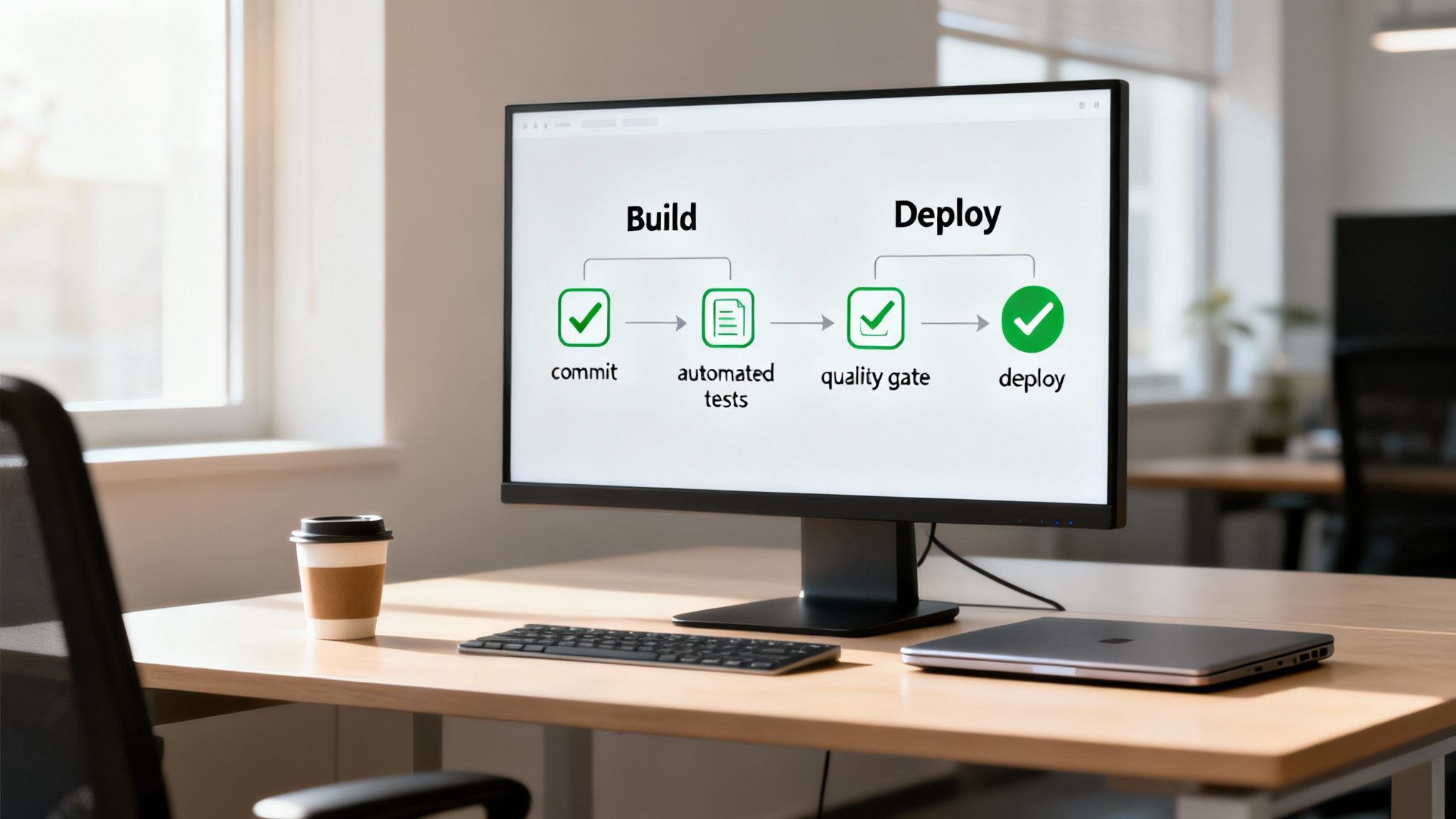
Static code analysis really shines when it’s not some special, once-a-month event. The real value comes from making it a seamless, almost invisible part of your daily development rhythm. When you weave it directly into your Continuous Integration/Continuous Deployment (CI/CD) pipeline, it stops being a chore and becomes an always-on automated assistant.
The idea is simple: set up your analysis tools to run automatically every single time code is committed or a pull request is opened. Platforms like GitHub Actions or Jenkins act as the trigger, kicking off a scan and giving developers instant feedback. This tight loop means buggy code doesn’t get a chance to linger, making fixes quicker and much, much cheaper.
This isn’t just a nice-to-have; it’s a cornerstone of modern software delivery. This “shift-left” approach, where security and quality checks happen earlier in the process, is becoming standard practice. While you can explore the growing market for static code detection tools, the foundational step remains clear code documentation.
Establishing Automated Quality Gates
One of the most powerful moves you can make is setting up a quality gate. Think of it as an automated bouncer for your codebase. Before any code can get merged or deployed, it has to get past this checkpoint.
If a static analysis scan digs up a critical security flaw or a show-stopping bug, the quality gate can automatically fail the build. This isn’t about punishing anyone; it’s about protecting the integrity of your code. A failed build is an unmistakable signal that something needs immediate attention, stopping major issues from ever reaching your main branch, let alone production.
Setting up these gates usually involves defining thresholds based on how severe an issue is. For instance, you could configure your pipeline to:
- Fail the build if any new “critical” or “blocker” security vulnerabilities are found.
- Generate a warning for “major” issues but let the build pass.
- Ignore “minor” or stylistic issues during the build, saving them for a later cleanup.
This gives you the flexibility to maintain high standards without bringing development to a screeching halt over minor infractions.